Skill Tree 1.0 is out. Release notes →

Skills that follow
the project,
not the session.

Skills, MCP servers and agent docs all take up your agent's context, in every session. Skill Tree gives each project only what it needs, in Claude Code, Codex, Pi and opencode.

~/.skill-hub34 skillsgo-servicetestingsecurityandroidterraformship-itreact-uipython-datanextjspayments-apiplatform-infracourier-androiddata-pipelinestorefront-androiddesign-systemmarketing-sitestorefront-webClaude CodeopencodeCodexPi
~/.skill-hub · 34 skillsgo-servicetestingsecurityandroidterraformship-itreact-uipython-datanextjspayments-apiplatform-infracourier-androiddata-pipelinestorefront-androiddesign-systemmarketing-sitestorefront-webClaude CodeopencodeCodexPi

Illustrative example. Every tier turns, so a long list still fits.

Want to never copy-paste a skill again?
01 — HOW IT WORKS

One registry.
Symlinks, not copies.

  1. 01

    Write it once

    A skill is a folder with a SKILL.md. It lives in one place: ~/.skill-hub.

  2. 02

    Group it

    Bundles are named sets. android holds what every Android app needs.

  3. 03

    Equip a project

    storefront-android gets android, testing and ship-it, plus the global essentials. Usage shows what the agents actually call.

  4. 04

    Sync

    hub sync links each skill into every agent the project uses. Links, not copies.

  5. 05

    Sharpen it anywhere

    Edit compose-screens once. Both Android apps have the new version in their next session.

~/.skill-hub/skills/compose-screens/SKILL.md
---
name: compose-screens
description: Build Android screens with Jetpack Compose.
  Keep state in the ViewModel, keep composables
  stateless, and give every screen a preview.
---

# Steps
1. Read the feature module and find the closest screen.
2. Define a UiState data class and a sealed Action type.
3. Write the stateless composable, then the ViewModel.
4. Add previews for loading, empty, error and content.
🤖androidstack5 skills · 2 projects
  • compose-screens~206 tokens
  • material-theming~59 tokens
  • room-database~71 tokens
  • + 2 more

Applied to storefront-android and courier-android.

storefront-android21 skills● in sync
BUNDLES
🤖 android 5🧪 testing 5🚀 ship-it 9🧰 essentials 3global
AGENTS
Claude Code Codex opencode
USED · LAST 30 DAYS
45 sessions · 8 of 21 skills used
  • compose-screens32
  • review-diff25
  • write-unit-tests20
  • open-pr14

13 skills unused this month. Each still costs context in every session.

$ hub sync
Project skills:
  storefront-android [~/code/storefront-android]
    effective harnesses: Claude Code, Codex, opencode
  ✓ .claude/skills/compose-screens → ~/.skill-hub/skills/compose-screens
  ✓ .agents/skills/compose-screens → ~/.skill-hub/skills/compose-screens
  ✓ .claude/skills/room-database → ~/.skill-hub/skills/room-database
    … 39 more (21 skills × 2 folders)
    # Codex and opencode both read .agents/skills/
  courier-android [~/code/courier-android]
  ✓ .claude/skills/compose-screens → ~/.skill-hub/skills/compose-screens
    … more
✓ sync complete
~/.skill-hub/skills/compose-screens/SKILL.md
- 4. Add previews for loading, empty, error and content.
+ 4. Add previews for every state, light and dark.
1 file · 3 links · 0 copies to update
02 — THE APP

Everything about a project, on one screen.

One project in the desktop app. Five answers you otherwise dig out of dotfiles and session logs.

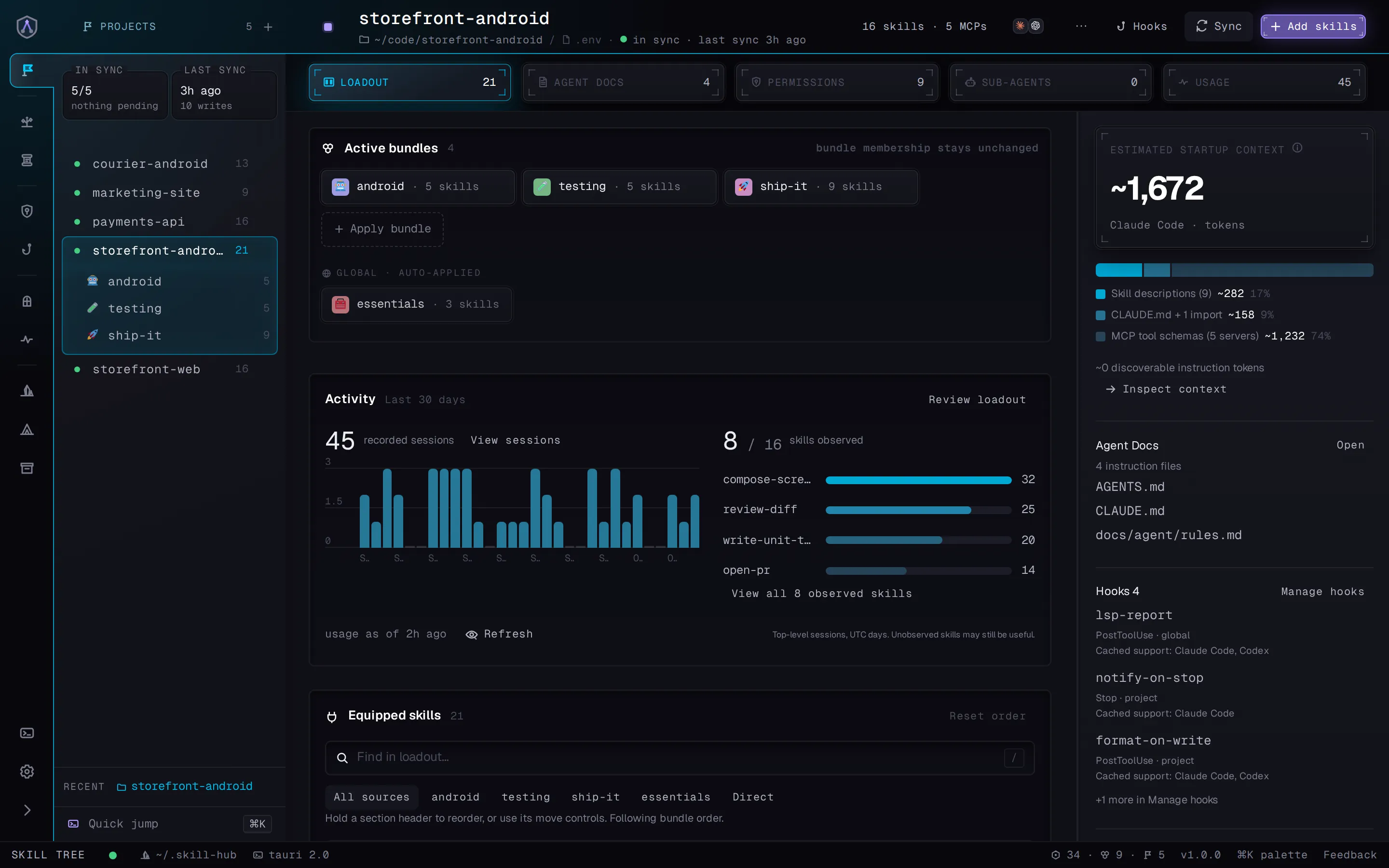
A project in the Skill Tree app: its bundles, the global bundle, the context estimate, 30 days of activity with the most used skills, agent docs and hooks.
  1. Bundles. What the project gets, including the global layer.
  2. Context cost. What the loadout costs before the first prompt.
  3. Activity. Which skills the agents used in the last 30 days.
  4. Agent docs. Every instruction file the agents read.
  5. Hooks. What runs around each tool call, per agent.
03 — NEW IN 1.0

It knows what your agents actually use.

Usage

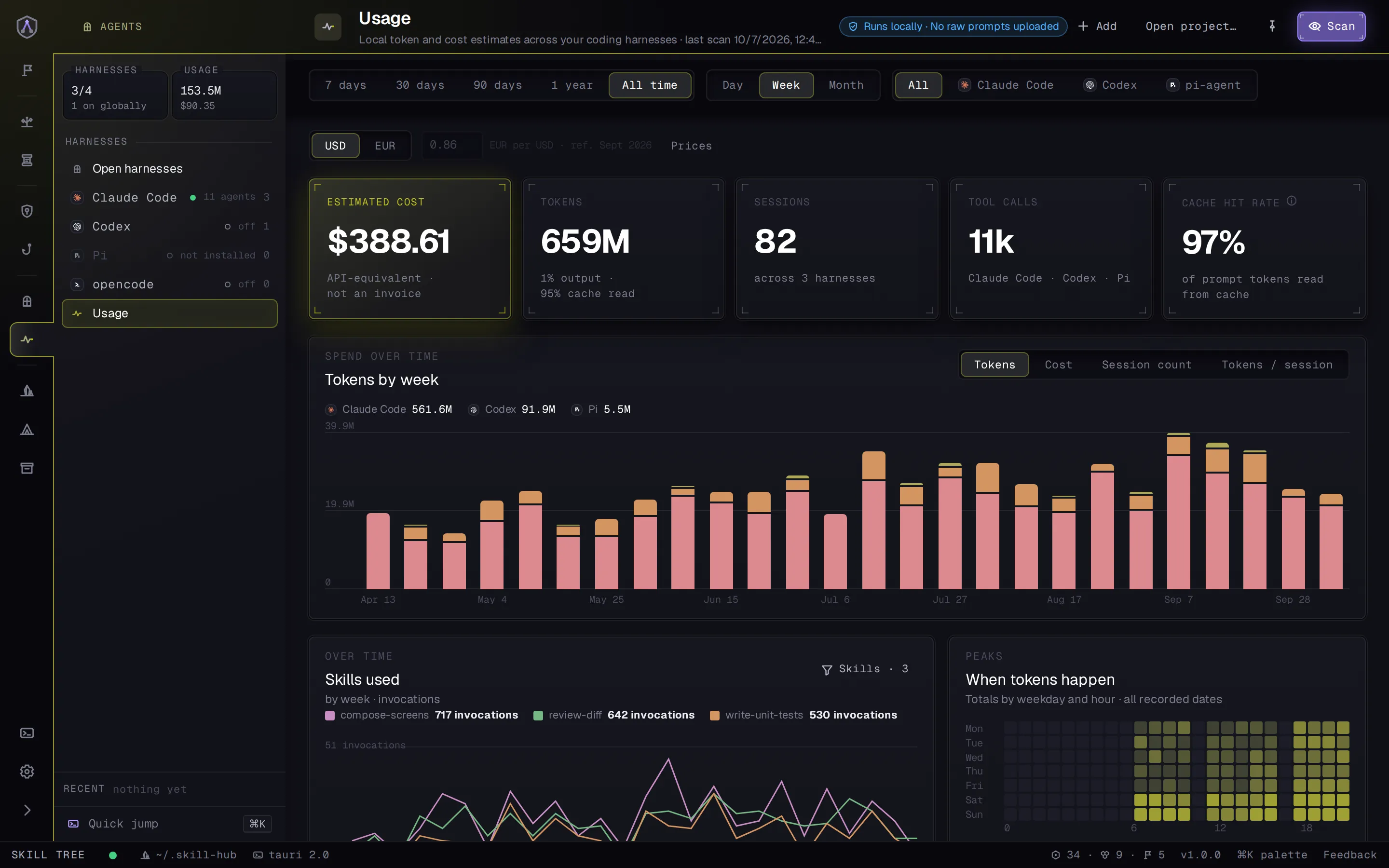
Tokens, cost and sessions per agent, project and skill, read from your agents' own logs on your machine. See which skills earn their place in the context window, and which ones just sit there.

The Usage screen: estimated cost, tokens by week per agent, and a heatmap of when tokens happen.
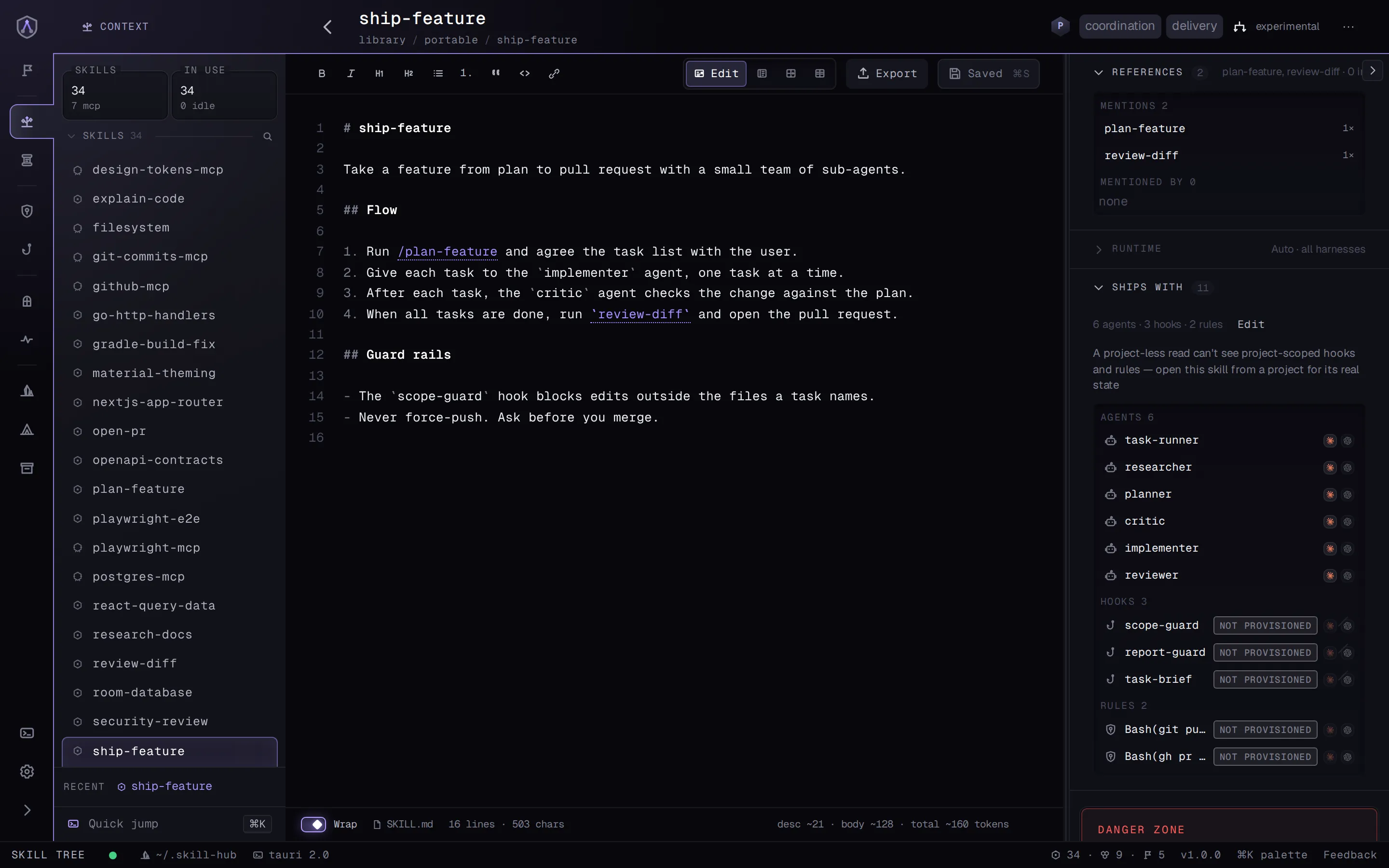
The ship-feature skill with its Ships with section: sub-agents, hooks and permission rules that come along when you equip it.

Companions

A skill brings the sub-agents, hooks and permission rules it needs. Equip the skill, and they come along.

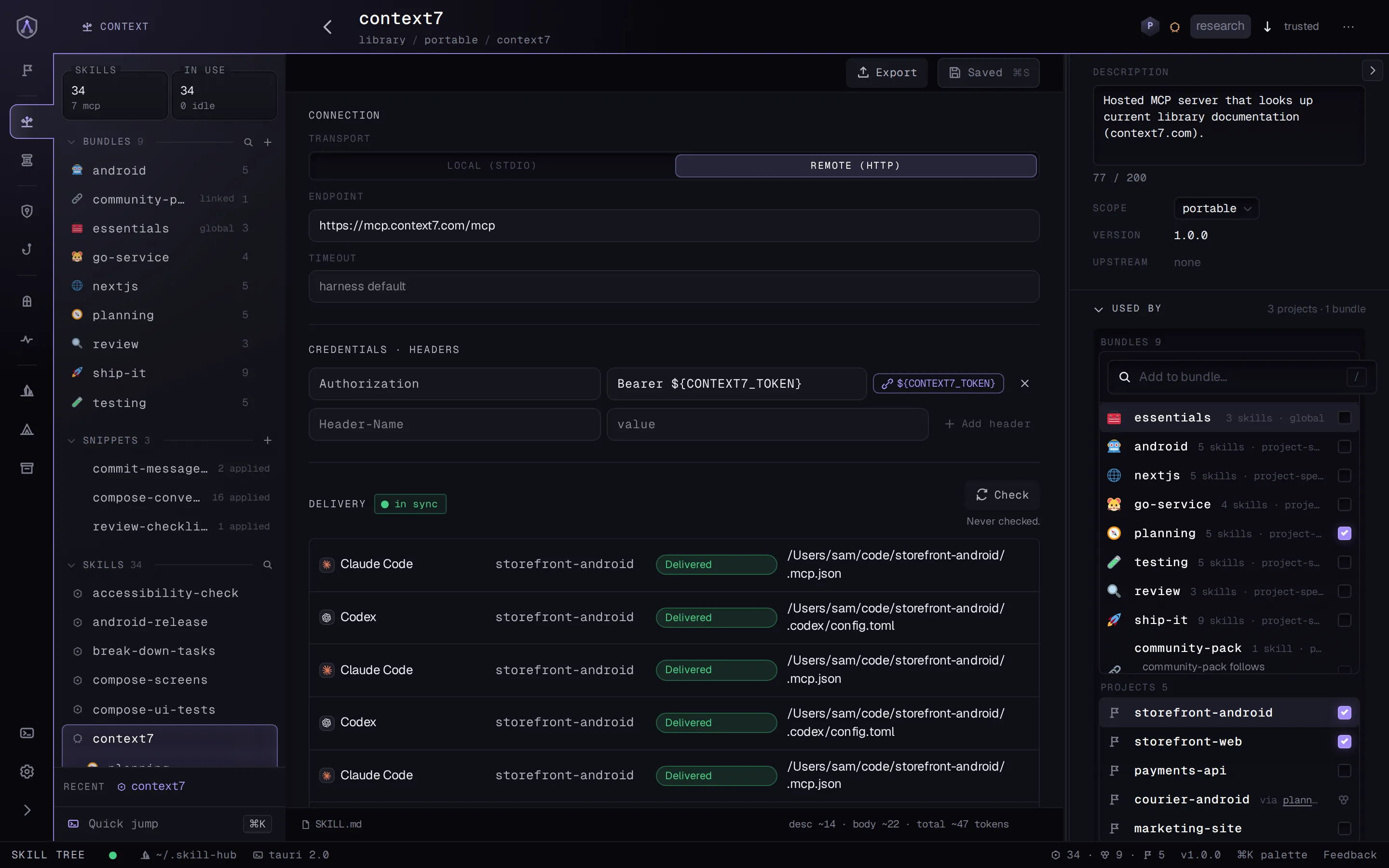
An MCP server in Skill Tree with its connection, a secret as a variable reference, and delivery status for each agent.

MCP servers

Same model as skills: define once, keep secrets as ${VAR} references, equip per project. Each agent gets it in its own config.

04 — ALSO IN THE BOX

The rest of your agent setup, handled.

acme/agent-skills · source● 2 updates
  • pdf-tools1.3 → 1.4
  • code-review1.1 → 1.2
  • frontend-design2.0
$ hub source add git https://github.com/acme/agent-skills

Skills from other people's repos

Follow a Git repository of someone else's skills, take the ones you want, and put them in bundles and loadouts like your own. Skill Tree shows what changed upstream before you pull it in.

storefront-web · agent docs4 files
  • AGENTS.md~410 tokens
  • CLAUDE.md → AGENTS.mdlink
  • apps/checkout/AGENTS.md~180 tokens
  • docs/agent/rules.md~95 tokens
mentions: nextjs-routingreview-diff

Agent docs

Every AGENTS.md and CLAUDE.md in a project, nested ones included, with the skills each mentions and what it costs in context.

backup● backed up 2 min ago
~/.skill-hub-backup → github.com/you/skill-hub-backup private
registryskillssub-agentsagent docs
$ hub bootstrap --restore-from git@github.com:you/skill-hub-backup.git

Git backup

Snapshots your library, sub-agents and agent docs to a private GitHub repo you own. A new machine restores from it in one command.

ci-runner-01● Delivered
applied generation 14 · checks every 5 min
  • payments-apiclaude-code, codex
  • platform-infracodex
  • data-pipelinecodex, pi

Headless machines

A Linux box follows the loadouts you pick. The Mac publishes signed revisions to a private Git feed, and a small receiver applies them, even while the Mac is offline.

05 — FOR AGENTS

Your agent can set it up, too.

Skill Tree ships its own MCP server. Ask Claude Code or Codex to equip a bundle or write a new skill, and it works on the same registry you see in the app.

  • AppBrowse, compare and decide.
  • CLIEvery action is a hub command. Script it.
  • MCPYour agent lists, equips, creates and syncs mid-session.

Everything stays
on your machine.

Your library is plain files in ~/.skill-hub. No account, no cloud service in between.

  • links, not copies
  • usage read from local logs
  • backups to a repo you own
06 — QUESTIONS

Questions developers ask before they switch.

Who is Skill Tree for?

Developers who build with coding agents across many projects, solo or in a small team. It is context engineering for your agent harnesses: you decide once what Claude Code, Codex, Pi or opencode should know in each project, and Skill Tree keeps it that way.

Can Claude Code and Codex share the same skills?

Yes. You keep one copy of each skill in ~/.skill-hub. Skill Tree links it into .claude/skills/ for Claude Code and into .agents/skills/ for Codex, Pi and opencode. Fix a skill once, and every agent sees the fix.

Can I keep a skill out of projects that don't need it?

That is the whole idea. Put the skill in a bundle and apply the bundle where it belongs; every other project stays clean. Skills you want everywhere go into a global bundle.

Does it copy files into my repositories?

No, it links them. Each project gets symlinks into your library, so there is nothing to keep in sync by hand and nothing drifts.

Can I use skills from someone else's repository?

Yes. Add a Git repository as a source, choose which of its skills you want, and use them in bundles and loadouts like your own. Skill Tree checks the source for updates and shows the diff before you sync.

Is it only for skills?

No. The same library holds MCP servers, with secrets kept as ${VAR} references. Skill Tree also manages AGENTS.md and CLAUDE.md, permission rules and hooks, per project and in each agent's own format.

Can my agent set it up for me?

Yes. Skill Tree ships an MCP server, so Claude Code or Codex can list your projects, equip bundles, create skills and sync on your behalf. Every action is also a hub command for scripts.

What leaves my machine?

Your library lives in ~/.skill-hub. Usage numbers come from your agents' local logs, and no prompts are uploaded. Backups go to a private GitHub repo you own, and only if you turn them on.

Which platforms does it run on?

The desktop app is built for macOS. Linux works from source on a best-effort basis. Windows is not supported.

Day one starts from your setup.

First run reads the skills you already have and builds the registry out of them. Nothing to author before it's useful.

$curl -fsSL https://skill-tree.tech/install.sh | sh

Installs Skill Tree.app and the hub command on macOS. Checks the download's SHA-256; no sudo, no shell-profile edits.

Saved you a copy-paste? Star it on GitHub